
Hardware
| Catalogue ID | CVH-0240 |
|---|---|
| Manufacturer | Jaystonian's Retro |
| Region | Canada |
| Year | 2025 |
| Platform | ColecoVision |
| Status | Released |
| Manufacturer site | https://www.tindie.com/products/jaystonian/colecovision-video-memory/ |
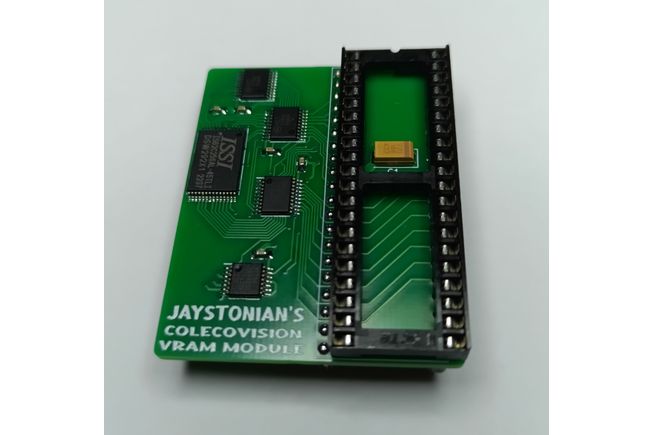
This is a modern, low-power video memory replacement module for ColecoVision CVS consoles.
To install, you will need to remove your TMS9918/TMS9919/TMS9928/TMS9929 video processor chip. This is the 40-pin chip with the large heatsink on your CVS, in the middle-right side of your PCB. You should MARK your heatsink to indicate which is the right side, to remember which is Pin 1, as it is difficult to discern while the heatsink is attached. Use a sharpie to paint the right-hand side (towards the right edge of CVS PCB) of this heatsink for later re-installation. Desolder this chip carefully. The old DRAM banks do not need to be removed, you can cut power to this section to minimize power usage, or you can desolder these DRAM chips, or you can merely cut the legs along the sides of the chips with flush-cutters then easily remove the legs individually with a soldering iron to clean up your PCB without damaging it. You can install a 40-DIP socket of your choosing or solder the new video memory module directly in place, with the Pin-1 notch facing the right-side of your CVS PCB. Then install the original heat sink chip into the socket on the video memory module.
Your CVS case will need to be modified, as there is a center-post that interferes with this module (it contacts the large heatsink) by about 10mm or half an inch. Also you will no longer be able to fit the metal cage top. If you remove the heatsink, or use a new TMS992x chip, install a shorter heatsink with heatsink tape, such as a square BGA-type heatsink, you will not need to discard the metal cage or remove the center support post. A good quality modern heatsink for this chip only needs to cover the center portion of the video chip, as this is where all the heat originates and spreads across the chip.